Posts

How does Nested-Virtualization works?
Image
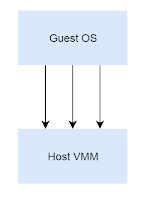
What is Nested virtualization? ----------------------------------------------------------------------------------------------------- Nowadays, Software Security is becoming more important criteria in the industry, and in recent years, virtualization as a popular topic for protecting / attacking a software, however, most of the virtualization technology framework (bluepill-liked) is not provide an ability that let a guest virtualize one more layer, we called it "Nested Virtualization", level 2. Basic Virtual Machine Monitor Architecture ------------------------------------------------------------------------------------------------------ Figure[1] Host VMM trap any type of event which wants to monitor, such as, Interrupt, exception, privileged register access, one of this event is VMX instruction, after VMM loaded, VMM can always monitor a any one of the  VMX instructions, which provide a good chance for us. As following chart: Figure[2] VMM Life Cycle ...
About Spectre

引言 現今操作系統(OS)設計一般分為應用層 (Ring 3) 與 內核層(Ring 0) , 應用層屬於普通應用程式級別, 而內核層屬於OS的代碼, Intel CPU Spectre漏洞產生後, 有大量的非技術性文章, 但Google Project Zero的文章講得比較艱深, 因此筆者在這做一個比較簡單的解釋與定義 理論背景 Out-of-Order Execute(OoOE) -  非順序執行 即表示正常匯編語言(Assembly Language) 不按正常的順序執行, 這是因為處理器中的各個運算單元實際上是可以異步工作的, 不需要像8086等老CPU, 同步執行指令。常見的如Cache Load/Store Unit, ALU 等等 Indirect Branch Prediction (分支預測) - CPU在執行過程中, 遇上了分支的話, 會先進行分支預測, 如常見的if 則是分支指令之一, 而他對應的匯編指令一般不會等到比較后才執行, 而cpu發現比較需要更久的時間的話, 那就會把if中的內容優先執行, 而執行的內容不一定會影響到結果, 但是執行的內容使用到的緩存則不會被修改(L1/2 DCache) 詳見: The Intel Optimization Reference Manual section 2.3.2.3 ("Branch Prediction"): Spectre漏洞的產生就是基於以上兩個處理器優化機制而出現的 見以下代碼, 處理器在執行過程中, 假如arr1-length不在cache中, CPU則不會等到條件判斷完成才執行if{..}中的內容, 如果條件不成立, 才會退回對寄存器的影響, 但是arr1->data則會一直在L1 DCache中 struct array { unsigned long length; unsigned char data[]; }; struct array *arr1 = ...; unsigned long untrusted_offset_from_caller = ...; if (untrusted_offset_from_caller < arr1->length) {   unsi...

Windows Mini Class and Class Driver internal research notes

Image
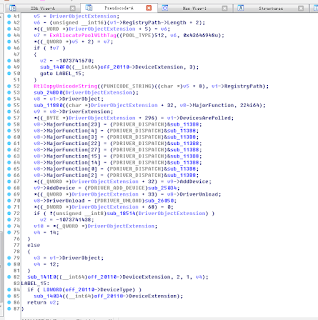
Background ------------------------------------- This is a first windows driver research notes in my blogger. And I will try to keep it simple and clear in this article, for who wants to understand the internal behavior of Class And Mini-Class Driver. ------------------------------------- Audience ------------------------------------- For who wants to understand Mini-Class and Class Driver internal. And understanding more about Hid Device stack. ------------------------------------- Introduction ------------------------------------- First, We are going to take a example of HidUsb and HidClass, the former is a Mini-Class Driver of a HidClass. We can simply think the relationships between them, is a child and parent relationship, Hidusb is one of the child of HidClass. HidClass can be thought as a helper module( like Dll do) in kernel mode, for helping all Driver who wants to join a hid family. ------------------------------------- Research ----...

Through IDA+VMWare for debugging any kernel function

Image
  Introduction : A most of time we used Windbg+ VMW are for kernel debugging. But there is a problem that we can not  use it for debug ging a  Interrupt Service Routine (ISR) . In such case system will be hang and occur a infinite loop within a interruption. Such as INT 3 breakpoint interruption. This is because the interrupt cannot be handled normally, the  breakpoint  exception is never been dispatched normally. Because of this reason, we actually can able to use a VMWare ’ debugging interfaces for debugging ISR. VMWare exported a interfaces with GDB, we can...

Nested-Virtualization - IA32_GS_BASE / IA32_KERNEL_GS_BASE remark

Image
Background:      Debugging with Nested-VMM hang issue when injecting nested #DB, and the infinite #PF occur, the system will be freeze.  Phenomenon: After Emulation of VMExit (L0 VMRESUME to L1), then causing VMExit Reason is 28 (CR access), and after that  the Kernel GS Base is changed. Try to intercept WRMSR and find the instruction which modify IA32_KERNEL_GS_BASE, therefore, as a follow screen capture: 0xFFFFF80002ADB369, which is in area of nt!SwapContext. Matched VMExit Reason PS. Because I take this screen capture at different time, so that address is not the same… and above: 0xFFFFF80002ADB369, there is a 0Xfffff80002a9c369 Analyze: -      Take a look at the red box in the following screen capture, the function will be directly execute WRMSR into a 0C0000102H (IA32_KERNEL_GS_BASE) MSR with actually qword ptr [r8+80h], r8 is an address of the current thread’s User Mode Scheduling Contro...